See what the best Mythic+ players of your spec actually run

Keystone Lens shows the talents, builds, gear and races of the top Mythic+ players of any spec, in a window that looks like part of the game. Its addon brings the same numbers into World of Warcraft.

The newest version · Windows 10 and 11

No install? Get the portable exe. What's new

  • Free and open source
  • No account
  • No ads or tracking
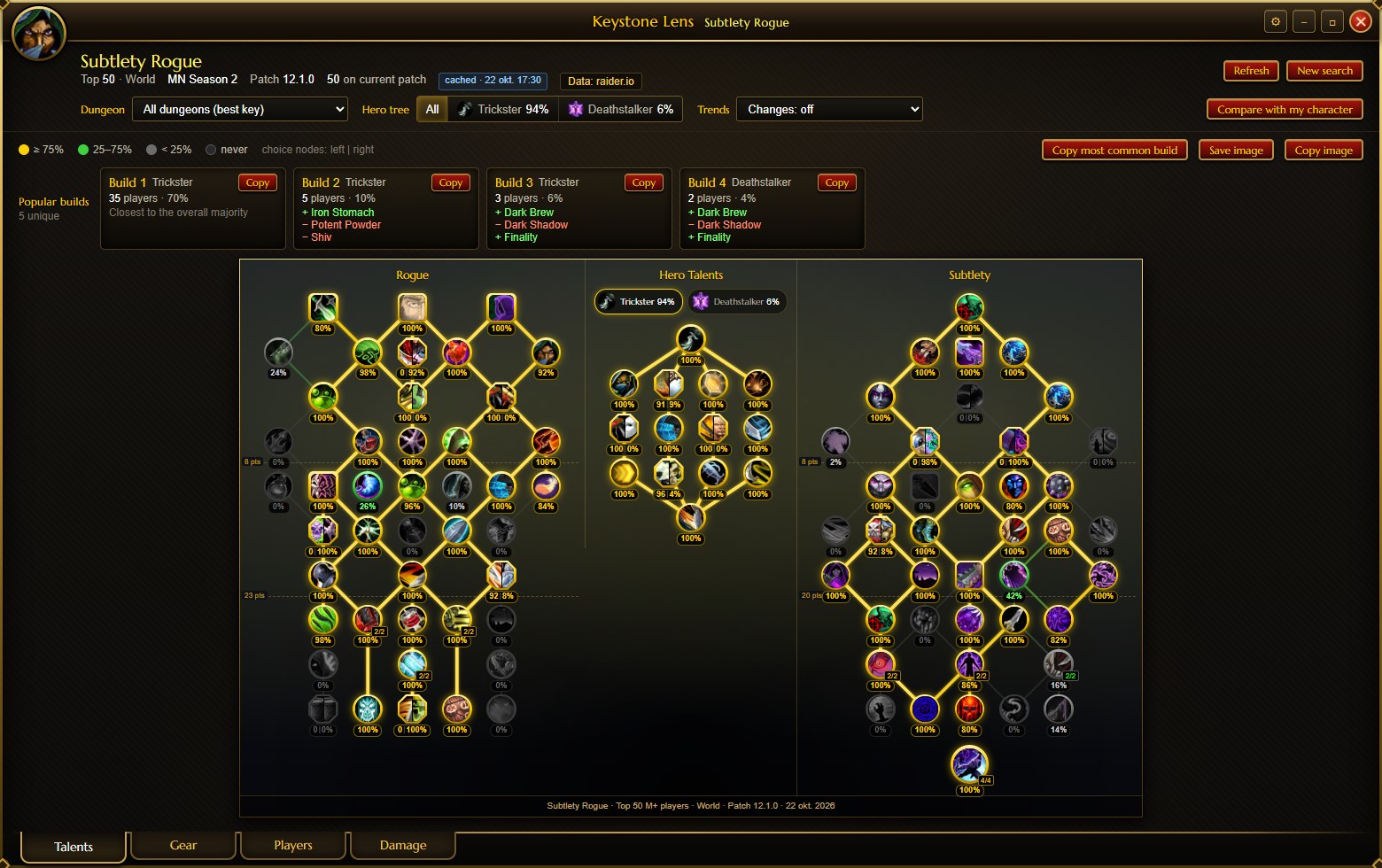
Keystone Lens showing a talent tree with the percentage of top players who pick each talent

Everything the top players do, in one place

Pick a class and spec. Keystone Lens finds its best players in this season's top keys on raider.io and reads the talents and gear each of them used in their best key on the current patch.

Popular builds and the class and hero talent trees with pick rates

Talents and builds

  • The class, hero and spec trees laid out like the game's talent window, with the % of players who pick every talent.
  • Popular builds, grouped from players with nearly the same talents, and how each one differs from the majority.
  • Copy a build's import string and paste it into the game.
  • Save or copy the tree as an image to share it on Discord.
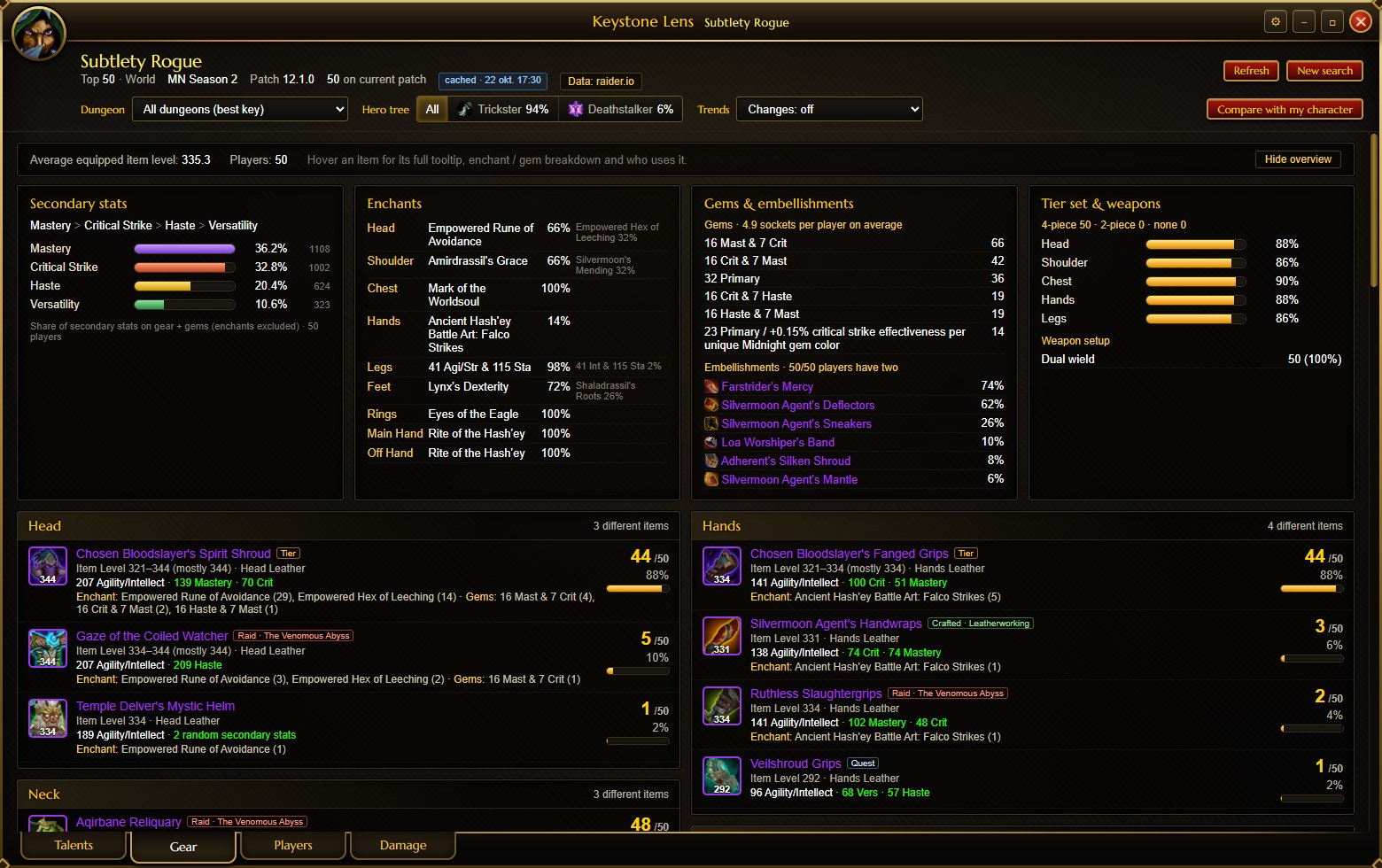
Secondary-stat priority and the top enchant per slot

Gear, stats and races

  • The secondary-stat priority, top enchants, gems, embellishments and tier pieces at a glance.
  • The items used in every slot and how many players use each, with exact stats, enchants and gems.
  • Where every item drops: which dungeon, raid boss, crafted or tier.
  • Which races the top players pick. Click a race to see its racial abilities for your class.
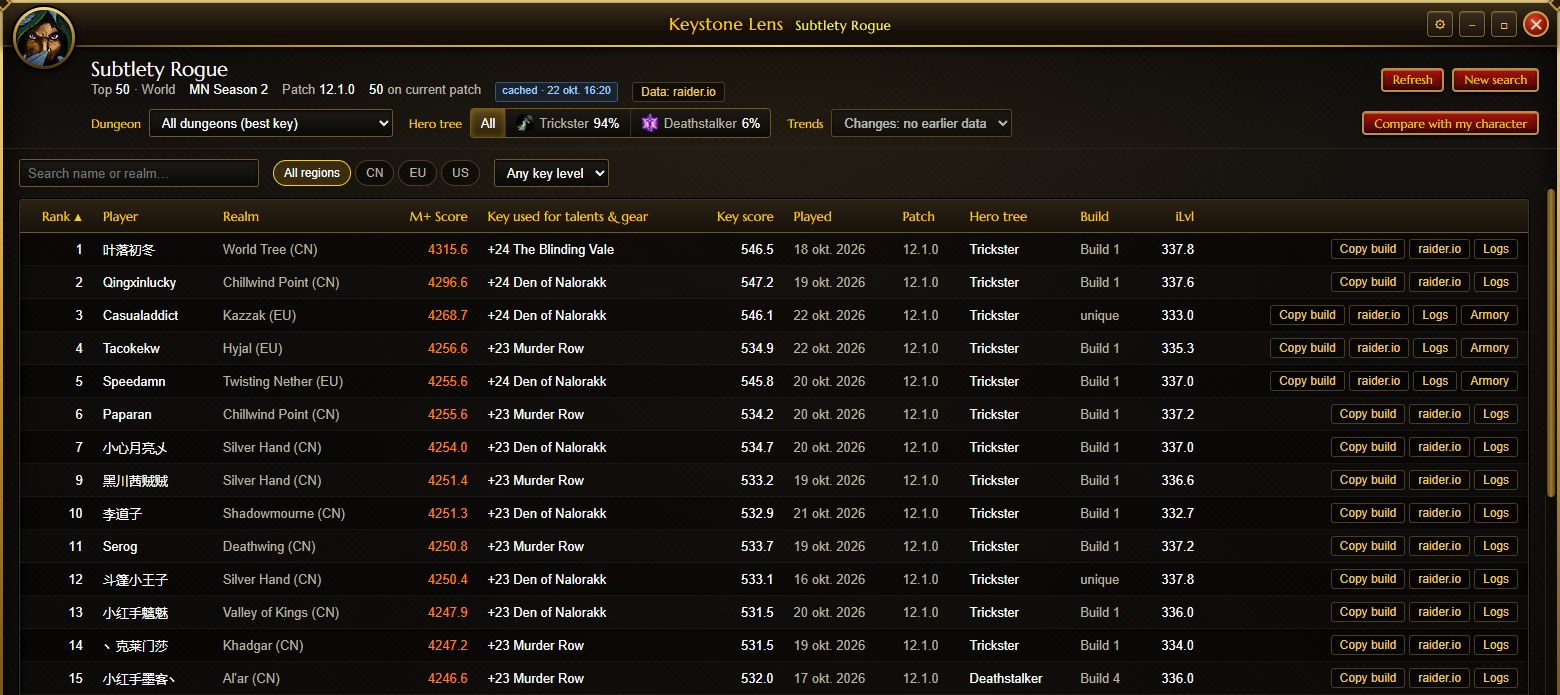
Table of the top players with score, key, hero tree, build and item level

The players behind the numbers

  • Every player in the sample with their race, score, key, hero tree, build and item level.
  • Click a player to see their own talent tree and gear, or open them on raider.io, Warcraft Logs and the Armory.
  • Filter everything by dungeon or hero tree, and see how pick rates changed since your last look.
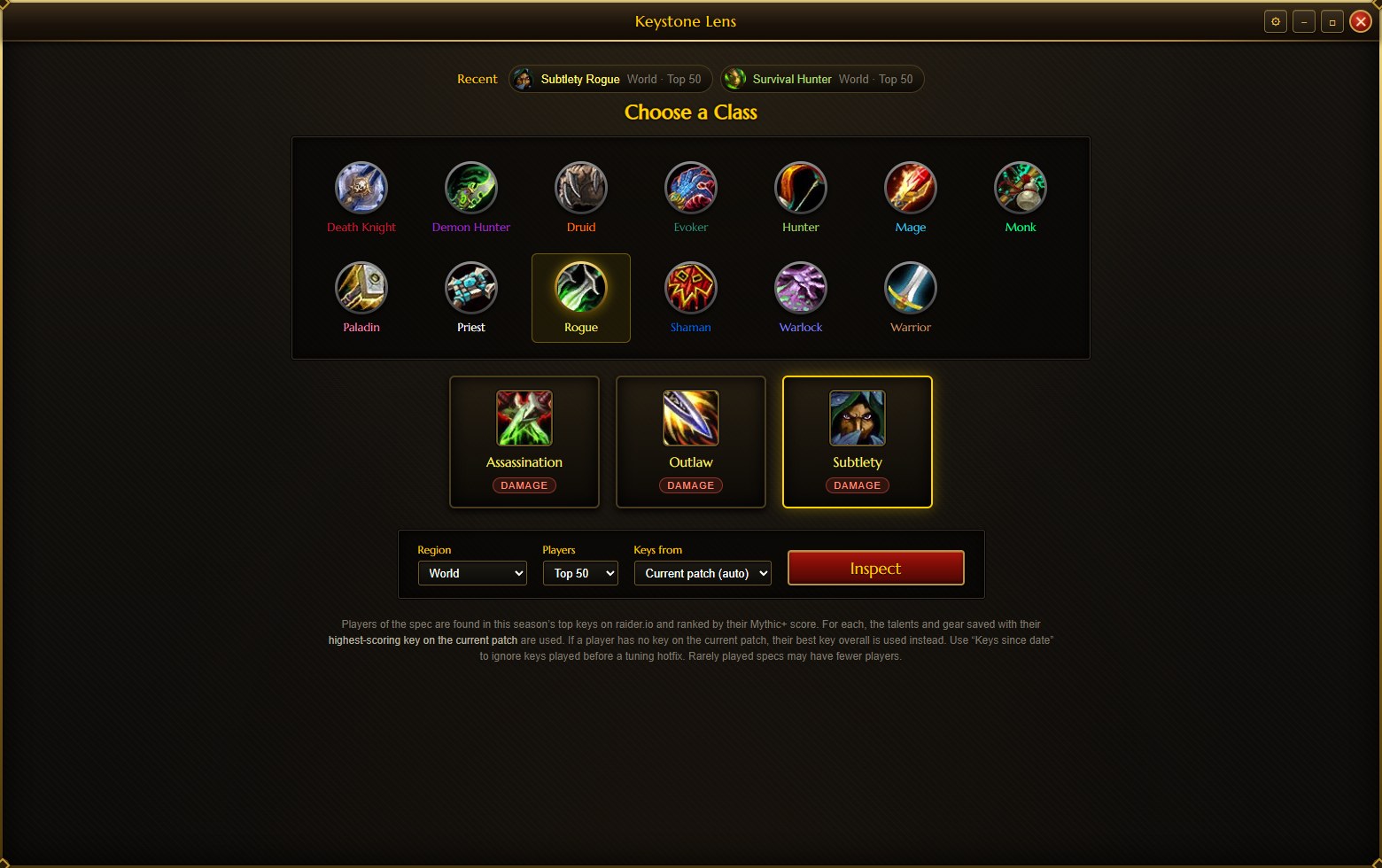
Class and spec picker with region, number of players and key options

Any spec, compared with you

  • All classes and specs, worldwide or by region, from the top 25, 50 or 100 players.
  • Compare with my character: your talents appear on the tree, with a red ring on popular talents you skip, and your items show next to the popular ones.
  • Load your character from raider.io, from the SimulationCraft addon, or straight from the Keystone Lens addon.

The same numbers inside the game

The Keystone Lens addon shows the top players' choices right where you make your own. The app installs it, keeps it up to date, and sends it the data of every spec you look at.

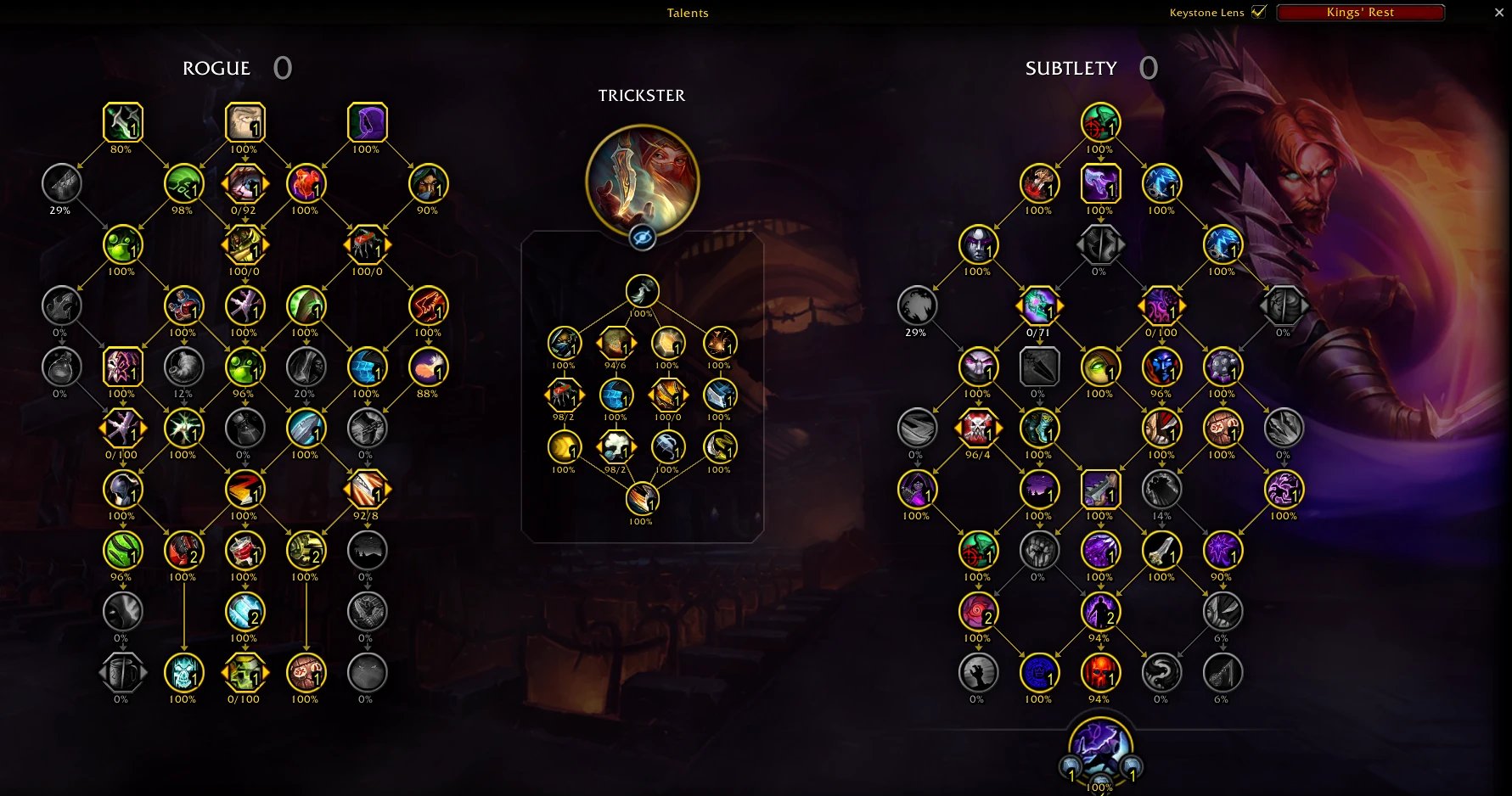
The in-game talent window with a percentage under every talent

On your talent window

  • The pick rate under every talent, and the split on choice talents.
  • A red frame marks a popular talent you skip, an orange one a rare talent you take.
  • Switch between all dungeons and each dungeon in the window's title row. It starts on the dungeon of your keystone.
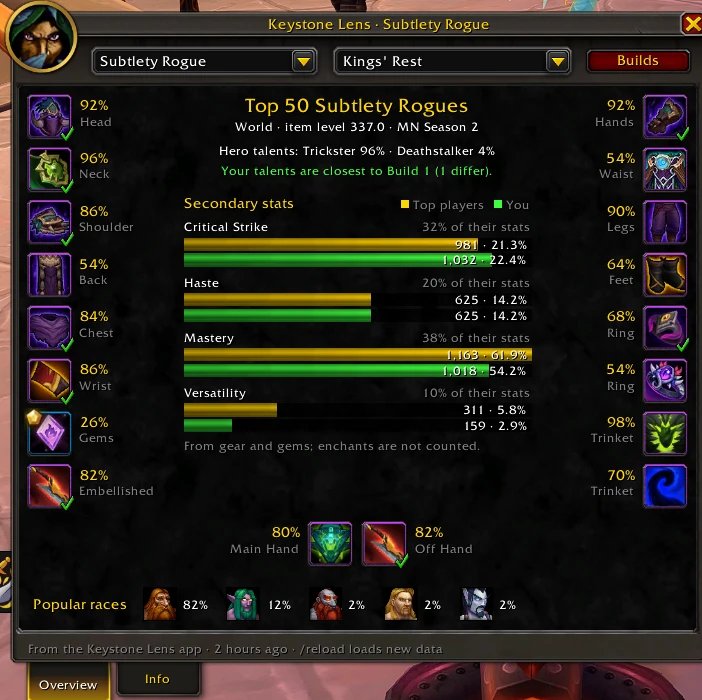
The Keystone Lens window in game with gear per slot, secondary stats and popular races

The /kl window

  • The top players' gear as a character pane, with a tick on the items you wear. Click a slot for every option, its enchants and gems.
  • Their secondary stats next to yours, and the races they play. Click a race for its racial abilities.
  • The popular builds per dungeon, what each changes from yours, a Copy string button, and Show on talents.
  • Item tooltips say how many top players of your spec use the item, and your characters are saved for the app's "Compare with my character".

The addon has no internet access, like every addon. It reads the data file the app writes, which loads when you log in or type /reload. Setting up the addon


Optional: damage numbers and raids

With your own free Warcraft Logs API key, Keystone Lens also shows the spec's damage and healing per dungeon and key level, your own logged runs next to them, and Raid mode: the talents and gear of the top 100 kills on every boss.

Warcraft Logs doesn't allow keys to be built into open-source apps, so this is off until you turn it on in ⚙ Settings → Warcraft Logs. Making a key takes about two minutes. How to set it up

Safe, private and open

No account, no tracking

Keystone Lens has no server, no login, no ads and no telemetry. Your PC fetches public data straight from raider.io, Wowhead and the game's data, and everything it keeps stays on your PC. Privacy policy

Open source

All the code is public under the MIT licence. Every release is built from it by GitHub Actions and comes with SHA-256 checksums, so you can check that your download is the published one.

Updates itself

The installed app downloads new versions in the background and installs them when you restart it. You can switch that to "Only tell me" or off in ⚙ Settings → Updates.


Questions

Windows says "Windows protected your PC". Is that normal?

Yes. The app isn't code-signed yet, so SmartScreen doesn't recognise it. Click More info, then Run anyway.

To check the file first, compare its checksum with SHA256SUMS.txt on the release page: how to check a download.

Is it free?

Yes, completely: no ads, no account, no paid version. It's a fan project and open source. If you'd like to support it, you can buy me a coffee on Ko-fi. It unlocks nothing; everything stays free for everyone.

Does it work on Mac or Linux?

No, only on Windows 10 and 11. The game addon gets its data from the app, so it needs the app too.

Where does the data come from, and how fresh is it?

From raider.io's list of this season's top keys. The app takes the players of your spec in those keys, ranks them by Mythic+ score, and uses the talents and gear each one had in their best key on the current patch. Item, talent and racial details come from the game's data through Wowhead, SimulationCraft and wago.tools.

A search is fetched fresh when it's over an hour old, or when you click Refresh.

Does it change anything in the game?

No. The app never touches the running game. It only writes the addon and its data file into your Interface\AddOns folder, the way an addon manager does, and reads the characters the addon saves. The addon only displays information; it doesn't automate anything.

Do I need a Warcraft Logs key?

No. Talents, builds, gear, races, players and the game addon all work without one. A key is only needed for the optional damage numbers and Raid mode.

Something doesn't work. Where do I report it?

In GitHub Issues. Mention your version (⚙ Settings → About), the spec and what you clicked. Never post your Warcraft Logs secret.

Try it on your spec

Download for Windows

The newest version · Windows 10 and 11

New to it? The guide walks you through your first search.

Keystone Lens is free, with no ads and nothing locked. If it helps your keys and you'd like to say thanks, you can buy me a coffee.

Buy me a coffee